
Here's How it Works
- You'll enroll in the program through your Smarthub account.
Mobile
- Login to Smarthub
- Click the ... in the bottom right
- Select Contact Us
- Select Account & Service Support
- Select Lighten the Load Signup
- Select today's date for the Required By Date field
- Click Send in the top right
Desktop
- Login to Smarthub
- Select Account & Service Support In the menu to the left
- Select Lighten the Load Signup from the dropdown
- Select today's date for the Required By Date field
- Click Send in the bottom right
- If you have trouble with this enrollment, please call 970-247-5786 and one of our Member Service Representatives can help you.
- You must ALSO enroll in email and/or text notifications in SmartHub to participate in our Lighten the Load program.
Mobile
- Login to Smarthub
- Select the ... in the bottom right
- Select Settings
- Select Contact Methods
- Confirm the phone and/or email address where you'd like to receive notifications is listed. If not, you'll need to add it via the phone or email icons at the top of the screen.
- Once added, click Settings in the top left to go back.
- Select Manage Notifications
- Select Usage
- Select Peak Time Alert
- Toggle the contact methods where you' dlike to receive notifications and click Save.
Desktop
- Login to Smarthub
- Click Settings in the menu to the left
- Select Contact Methods
- Confirm the phone and/or email address where you'd like to receive notifications is listed. If not, you'll need to add it via the green buttons for Add Email or Add Phone
- Select Manage Notifications from the menu to the left
- Select Usage
- Select Peak Time Alert
- Ensure the contact methods you'd like to use are highlighted in grey and click Save in the bottom right.
- Here’s a step-by-step guide to activating LTL Event notifications.
- If you have trouble with this enrollment, please call 970-247-5786 and one of our Member Service Representatives can help you.
- Once you’ve enrolled in the program, you will receive an alert via email or text message informing you about an upcoming time when you can save. Alerts are typically sent a day in advance.
- These events will usually be two to three-hour blocks and are likely to occur between 6:00 AM and 10:00AM and between 4:00 PM and 9:00 PM.
- During the time period specified in the alert, reduce your electric usage however you’d like.
- The goal is to use less power during the peak event time window than you normally would.
Ways to Reduce Energy Usage in Winter:
- Turn off heat tape and roof cables: These run continuously and can draw 5 to 12 watts per foot. Turning them off for a 2-hour window during an event can be one of the single biggest reductions available to most members.
- Drop your hot tub temperature: Drop the setpoint by 10 degrees before the event window. The tub will coast through two hours and recover after.
- Delay your EV charging: Delay your charge session until after the event ends. Most EVs let you schedule charging through the vehicle or the charger itself.
- Turn off electric space heaters: If you're running a portable space heater, turn it off during the window and layer up.
- Wait to run laundry and dishwasher: Push these to after the event. A dryer alone pulls 2,000 to 5,000 watts.
Check out this resource for more ways to save energy.
Check out our rebate offerings for even more ways to save.
- We calculate a baseline from your electric usage during recent similar days.
- If you reduce your energy use during the specified timeframe compared to your baseline, you will get rewarded with a bill credit on your next bill: $1 per kWH reduced compared to your baseline.
We're launching our Lighten the Load (LTL) program to increase awareness about peak power and the impact each member can have in helping decrease strain on our grid.
Our community uses the most collective power between 4 PM and 9 PM, which can cause long-term added stress to our system and result in the need to pull power from quick, less-clean energy resources.
What if we could make a shift and:
✔️Alleviate strain on the grid
✔️Reduce reliance on those quick, less clean energy resources
✔️Increase community-wide energy efficiency
✔️Earn bill credits for the energy you save
Lighten the Load rewards members for conserving electricity during specified periods when we forecast that the need for electricity will be higher than usual.
LPEA purchases wholesale power through the Southwest Power Pool. When demand spikes across our system, the cost of that power goes up, sometimes dramatically. Those costs get spread across all 35,000+ member accounts over time through rates.
Lighten the Load flips that equation. Instead of paying wholesale suppliers premium prices for peak power, we pay you to use less of it. Every kilowatt-hour our members collectively skip during a forecasted peak event is a kilowatt-hour we don't have to buy at the most expensive time of day. That keeps costs lower for everyone, and the members who participate earn bill credits for doing it.
If you're part of the Lighten the Load Program, we'll let you know when a Peak Event is coming, and you can help us keep usage down. PLUS! You'll save on your bill by reducing usage during those peak hours, AND we'll give you credit on your account for the energy you save.
Enrollment is voluntary, and there is no cost or risk to participate.
Sign up for Notifications from Desktop
- If you already have a SmartHub account you may skip this step
- You'll need the following information to set up your SmartHub account:
- Your billing account number
- Member's last name (or business name)
- A working email address
- Register HERE
- You may also access SmartHub via the green "PAY BILL" button at the top of the website or by downloading the APP

Once you are logged in to SmartHub, you'll be able to add your preferred contact methods
- Click the "Settings" tab (to the left side of the screen)
- Select "Contact Methods" from the "Settings" menu
- By default, the SmartHub registration email (you used to login) is added as an available contact. You may add additional emails and/or phone numbers to deliver LTL notifications to other people at your discretion.
If you don't wish to add a new email or phone contact (in addition to your registration email), proceed to Step 3.
- Select the contact method you'd like to add (phone or email)
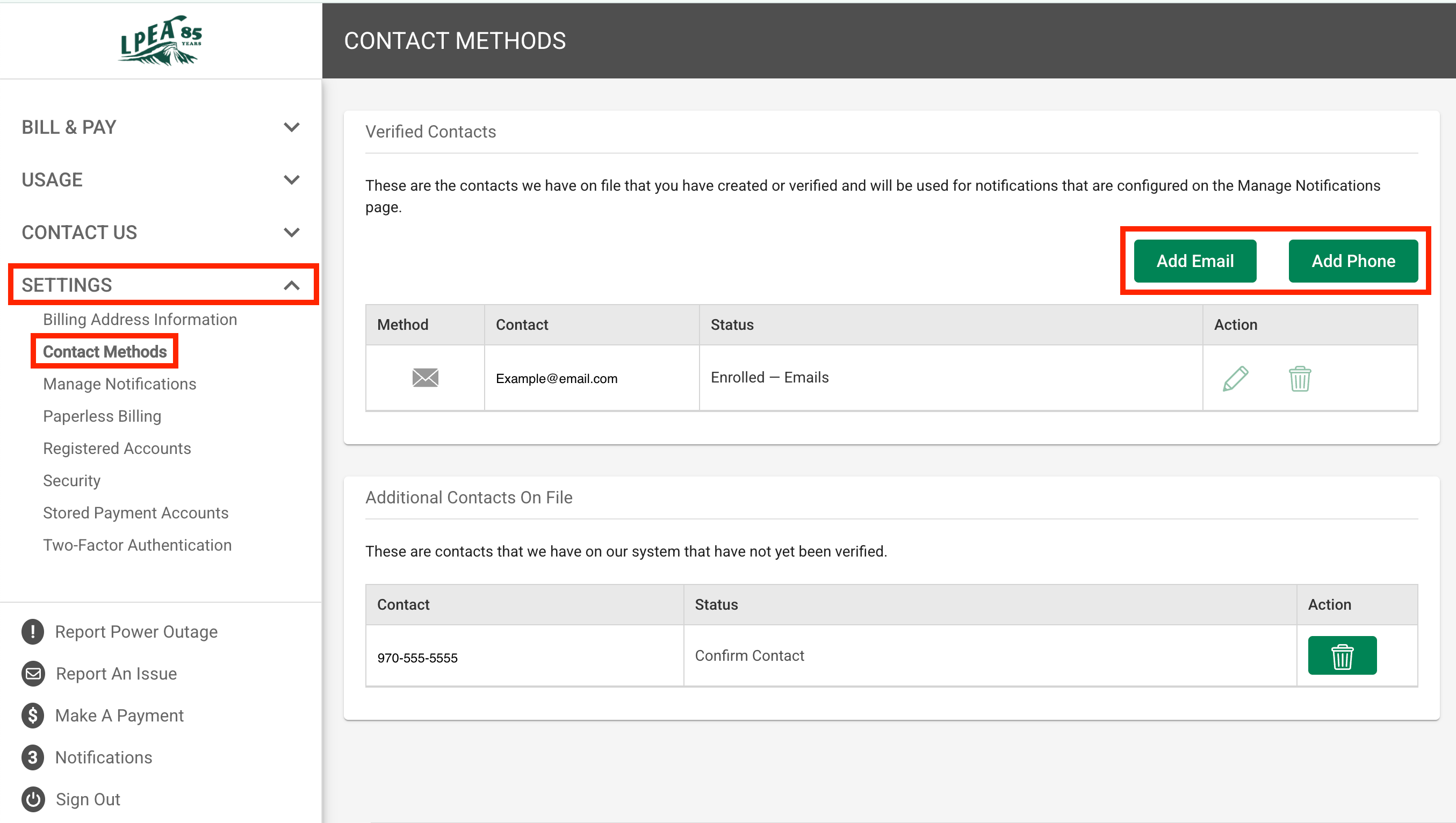
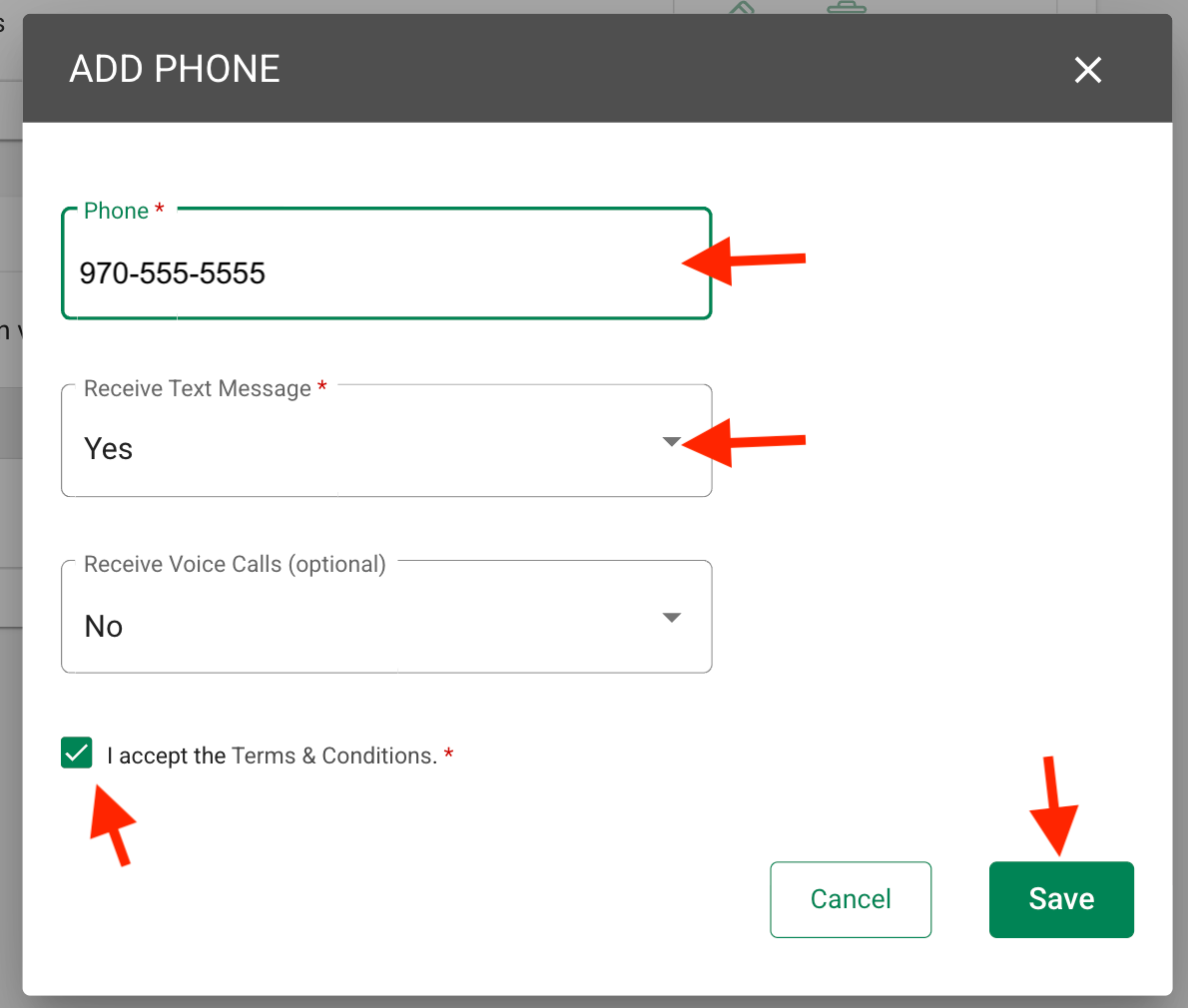
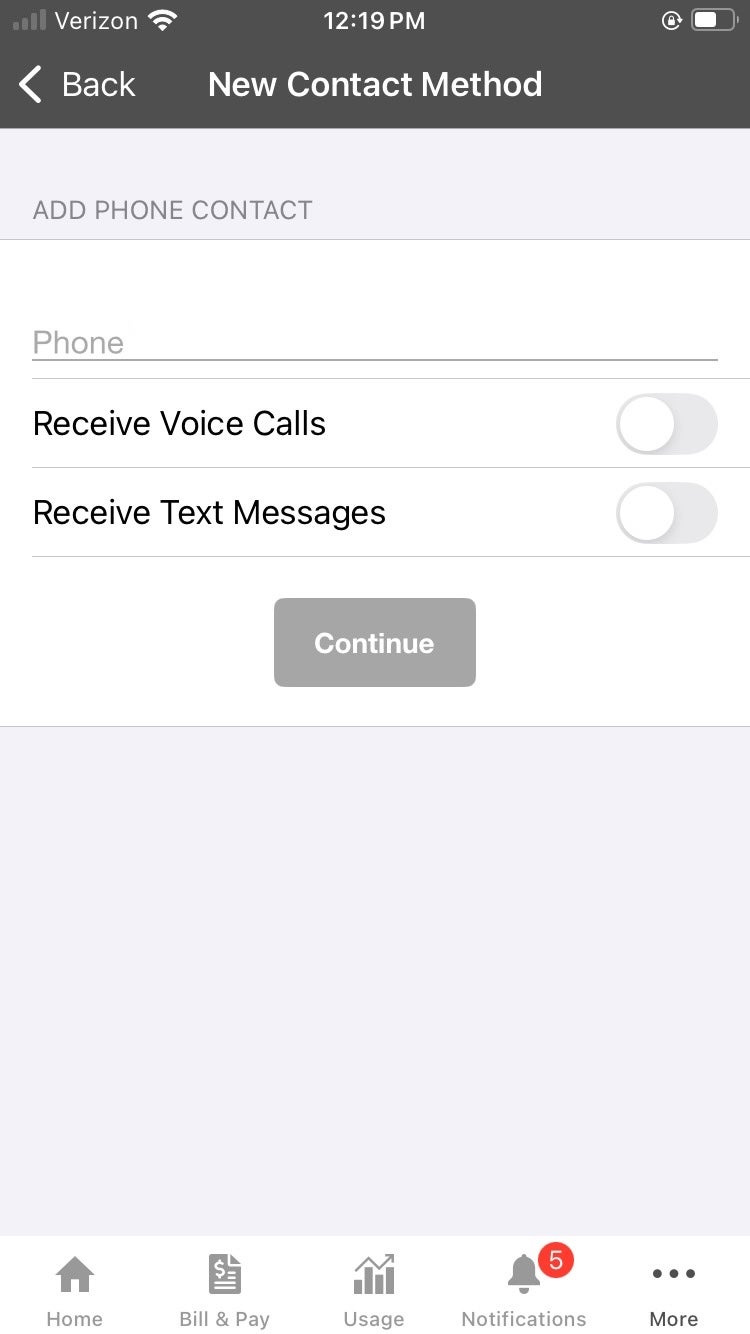
- If adding a phone number (Adding a new email address follows the same steps, without the text and voice call fields):
- Enter the phone number
- Select yes for text messages
- Select yes or no for voice calls (optional)
- Check the "I accept the Terms & Conditions" checkbox
- Click "Save"
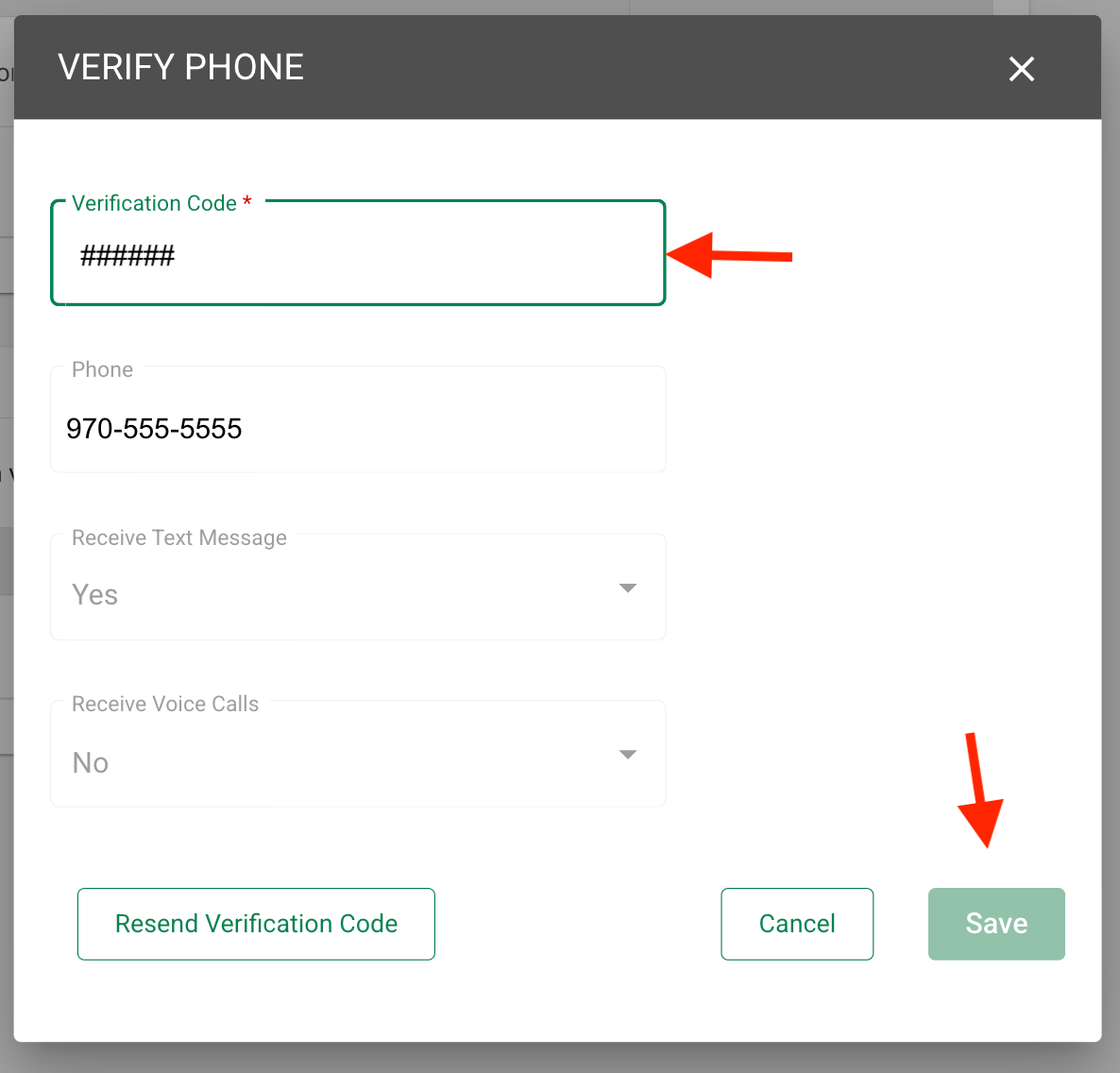
- A verification code will be sent to the number provided
- Enter the code into the verification code field when prompted
- Click "Save"
Once you've added your contact information, you may select the types of notifications you'd like to receive.
If you are enrolling in Lighten the Load, you MUST enroll your contact method (phone and/or email) in this notification type.
- Navigate to the "Settings" menu to the left of the screen
- Select "Manage Notifications"
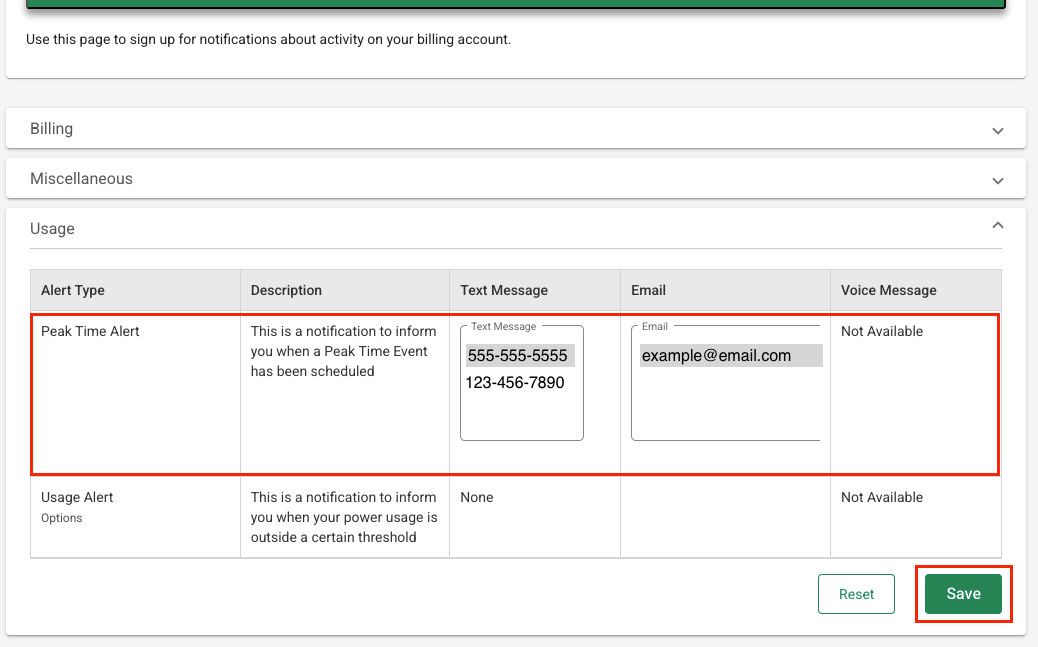
- Select the "Usage" drop-down
- Confirm or add your phone and/or email address for the "Peak Time Alert" notifications. **Be sure the phone number and/or email address you want to use are highlighted in grey.
- Click "Save"
To take full advantage of the program and earn the biggest savings, remember to adjust things like thermostats and hot tub temperatures, reschedule things like laundry and dishwashing, and turn off things like heat tape.
Sign up for Notifications from Mobile
- If you already have a SmartHub account you may skip this step
- You'll need the following information to set up your SmartHub account:
- Your billing account number
- Member's last name (or business name)
- A working email address
- Download the App HERE
- Select "Register Now" on the login screen then enter your information when prompted

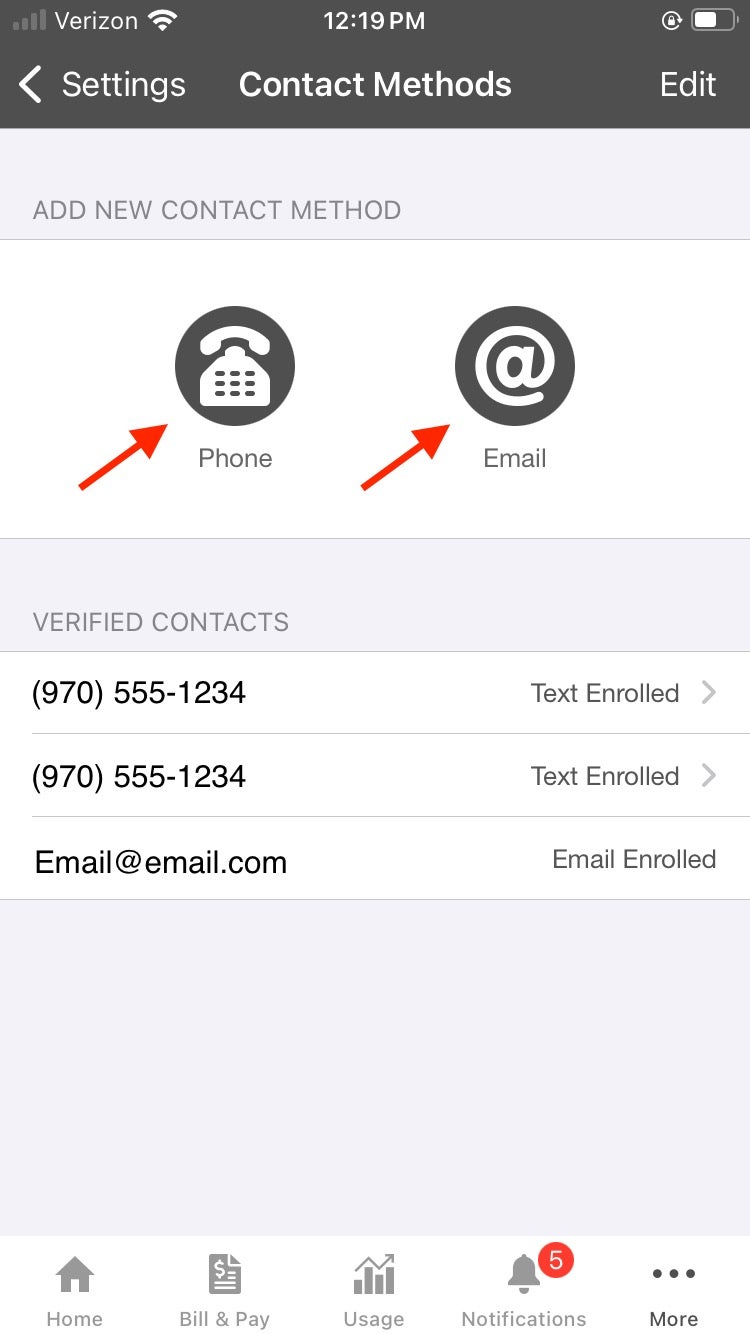
Once you are logged in to SmartHub, you'll be able to add your preferred contact methods
- Click the three dots in the bottom right of the app to access the "Settings" menu

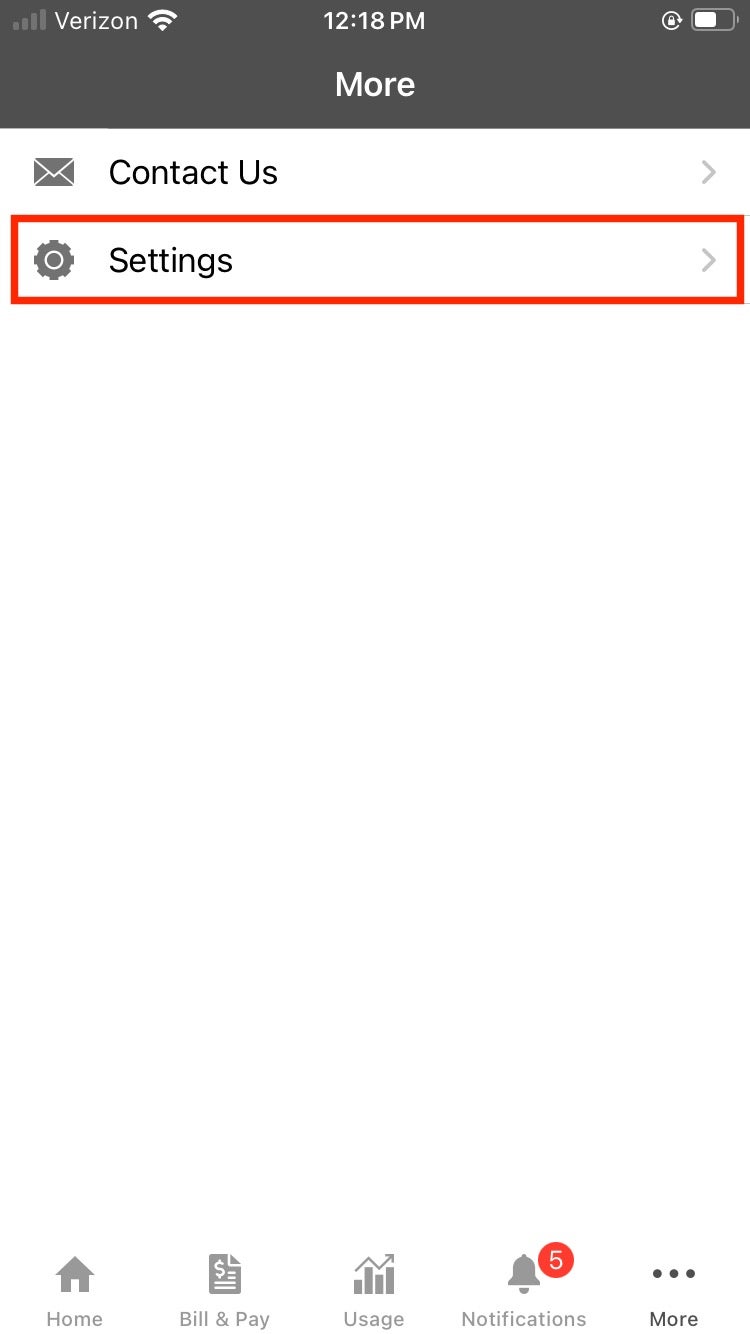
- Select "Contact Methods" from the "Settings" menu
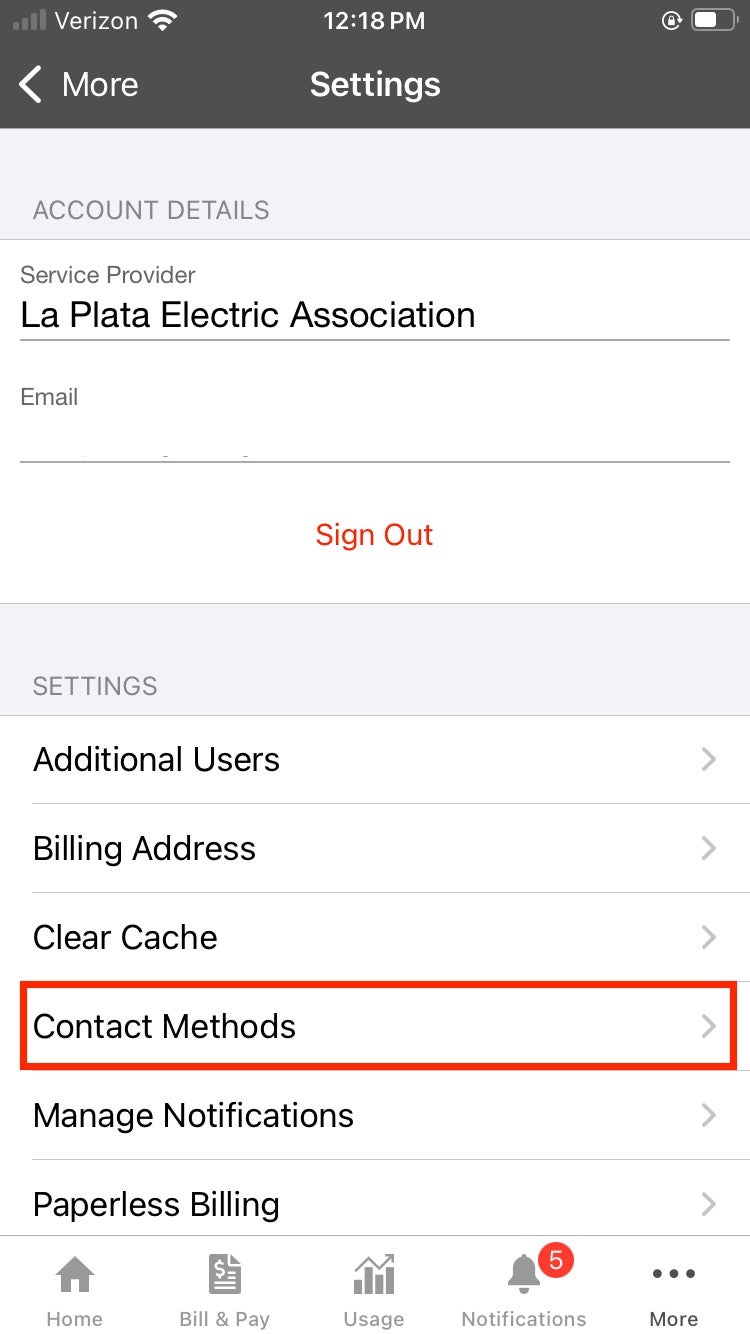
- By default, the SmartHub registration email (you used to login) is added as an available contact. You may add additional emails and/or phone numbers to deliver LTL notifications to other people at your discretion.
If you don't wish to add a new email or phone contact (in addition to your registration email), proceed to Step 3.
- Select the contact method you'd like to add (phone or email)

Once you've added your contact information, you may select the types of notifications you'd like to receive.
If you are enrolling in Lighten the Load you MUST enroll your preferred contact method (phone and/or email) in this notification type.
- Navigate to the "Settings" menu via the three dots to the bottom left of the app
- Select "Manage Notifications"
- Select the "Usage" Option
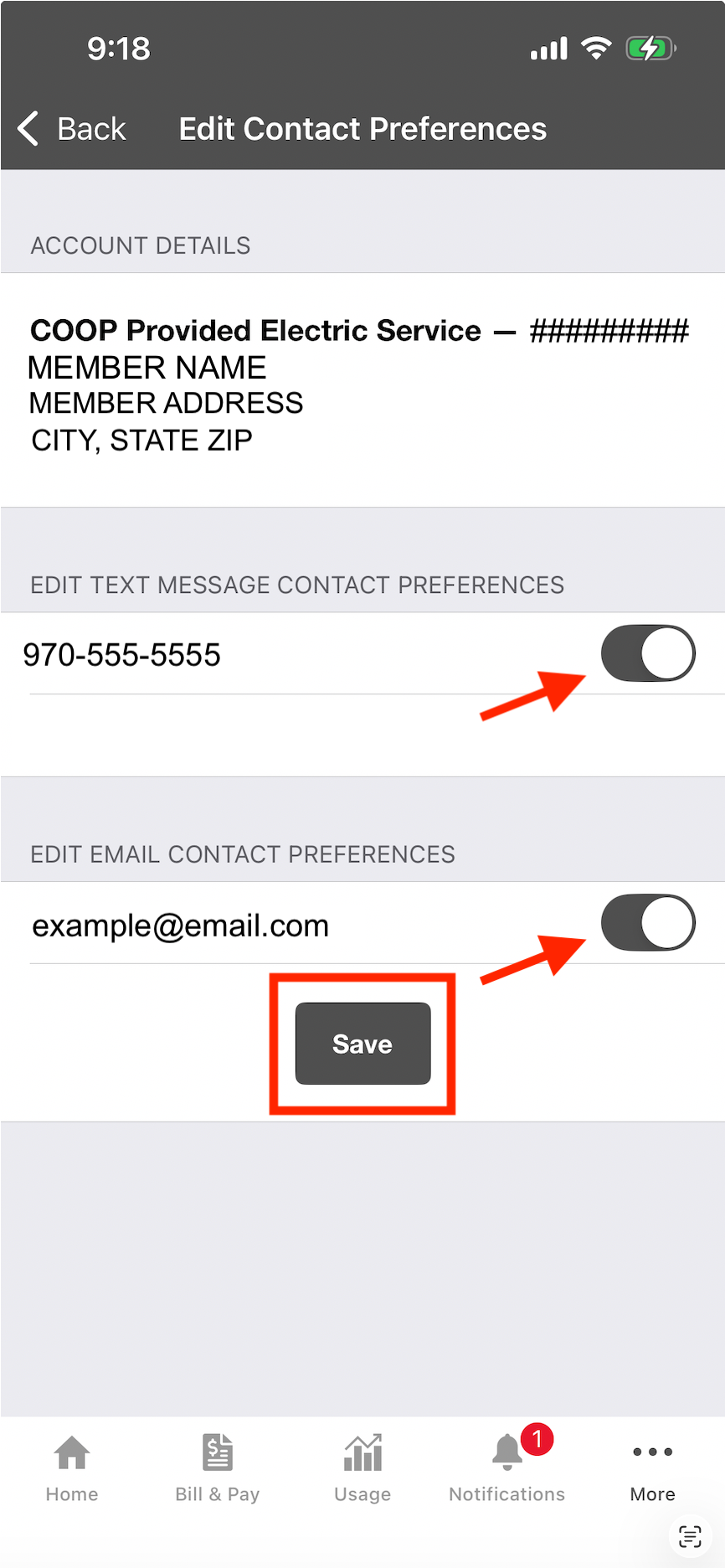
- Confirm that your phone number and/or email address is enrolled in the "Peak Time Alert" notifications.
- If not, tap on "Not Enrolled"
- On the "Edit Contact Preferences" screen that opens, tap the toggle button next to the phone number and/or email address you would like to enroll.
- "Save"


To take full advantage of the program and earn the biggest savings, remember to adjust things like thermostats and hot tub temperatures, reschedule things like laundry and dishwashing, and turn off things like heat tape.
Lighten the Load Program Terms and Conditions
1. Program Overview
The Lighten the Load program (Program) rewards Participants for reducing their electrical energy usage during designated Lighten the Load (LTL) Events. Participants can earn bill credits by lowering their electrical energy usage below their predicted baseline electrical energy usage during an announced LTL Event. Collective energy reduction during LTL Events can help lower costs from our power providers, which benefits the entire cooperative membership.
2. Eligibility
To participate in the LTL program, a Participant must:
-
Be a current La Plata Electric Association (LPEA) member with a residential electric account on either General Service (rate 10) or General Service Time-of-Use (rate 15/16), with or without net metering
-
Maintain an active email address or phone number and enroll in Peak Time Alert notifications in SmartHub to receive LTL Event notifications from LPEA
3. Lighten the Load Events
3.1 Event Notification
- LPEA will send notification of an LTL Event in advance, typically the day before the event
- Notification of LTL Events will be sent via email or text message or both based on Participant selection
- Through enrollment in the Program, the Participant consents to receive LTL Event text messages from LPEA and message and data rates may apply
- LTL Events will typically occur on Monday-Saturday, 6:00-8:00 AM or 5:00-7:00 PM, but may occur at any time
- LTL Events will typically be 3 hours or less
- LPEA expects to hold no more than 10 LTL Events per month
3.2 Event Participation
- Participation in any LTL Event is voluntary
- There is no penalty for not reducing electrical energy usage during LTL Events
- Participation begins on the date LPEA enrolls the account in the Program; LTL Events before that date are not eligible for bill credits
4. Lighten the Load (LTL) Bill Credit Calculation
For each LTL Event, LPEA will calculate baseline electrical energy usage consisting of an estimate of how much electrical energy the Participant’s home would normally have used during the LTL Event timeframe. A Participant’s bill credit will be based on how much their actual electrical energy usage during the LTL Event falls below this baseline electrical energy usage.
4.1 Baseline and Actual Electrical Energy Usage Calculation
A. Eligible days: LPEA looks back up to 30 days before the LTL Event and picks the Participant’s most recent eligible days:
- Weekday events: up to the 10 most recent eligible weekdays, with at least 4 required
- Weekend events: the 4 most recent eligible weekend days, all 4 required
Weekday and weekend usage are calculated separately so that different routines on weekends do not skew the weekday baseline, and vice versa.
B. Ineligible days: A day is not an eligible day to be included in the baseline calculation if:
- A previous LTL Event happened that day
- The Participant’s meter is missing any readings during the LTL Event hours on that day
- The day was a holiday that LPEA has designated for exclusion (currently Thanksgiving and Christmas for accounts on the Time-of-Use rate)
Missing readings outside the LTL Event hours do not make a day ineligible.
C. Usage is averaged by meter intervals: A Participant’s meter records electrical energy usage in certain intervals, typically hourly. LPEA averages each hourly meter interval across eligible days. For example, for a 4:00–7:00 PM event, the baseline electrical energy usage for 4:00–5:00 PM is the average of a Participant’s 4:00–5:00 PM electrical energy usage on the eligible days. This is repeated for each hourly interval in the LTL Event. If a meter records 15-minute intervals, the electrical energy usage will be averaged with that same meter interval on eligible days. For instance, the baseline for 4:00-4:15PM will be the average electrical energy usage from 4:00-4:15PM on eligible days. This is repeated for each 15-minute interval in the LTL Event. If an LTL Event starts or ends partway through a metered interval, the whole meter interval is included and subject to the percent overlap calculation below to cover the full LTL Event time window. For accounts with net metering, the baseline is calculated from net electrical energy usage on eligible days and can be a negative value.
D. Percent overlap (partial interval handling): Each meter interval is compared against the LTL Event interval to determine the percent overlap. The interval value is multiplied by the resulting overlap percentage. In most cases the overlap is 100% and the full interval value is used. Partial overlaps occur when the LTL Event start/stop time does not align with an interval boundary. For example, for a meter on hourly intervals, an LTL Event from 4:30-6:00 PM will take hourly meter readings from 4:00-5:00 PM and 5:00-6:00 PM and apply an overlap percentage for the first interval of 50% and 100% for the second interval. This percentage is multiplied by the interval-level electrical energy usage values in the baseline calculation and the actual electrical energy usage across the LTL Event time window.
E. Baseline comparison with actual usage: For each LTL Event, LPEA compares the summed baseline predicted electrical energy usage with the summed actual electrical energy usage across the entire event window. The difference is a Participant’s electrical energy usage reduction for that LTL Event. Since the comparison uses the event total, an increase in one hour offsets a reduction in another. For example, in a 3-hour event with a baseline of 2.0 kWh each hour, a Participant who uses 1.0, 1.5, and 3.0 kWh has a total reduction of 0.5 kWh (6.0 kWh baseline minus 5.5 kWh actual).
F. Net-metered accounts: For accounts with net metering, actual electrical energy usage during an LTL Event is measured as net usage: electrical energy received from LPEA minus electrical energy exported to LPEA’s system. Exported electrical energy counts toward a Participant’s reduction. For example, if a Participant’s baseline for an LTL Event is -1.0 kWh and the Participant’s net usage is −1.5 kWh (1.5 kWh more exported than received), the reduction is 0.5 kWh.
G. Insufficient data: If an account does not have enough eligible days within the 30-day lookback (at least 4 weekdays for a weekday event, or 4 weekend days for a weekend event), LPEA will not be able to calculate a baseline electrical energy usage, and the Participant will not be eligible for a bill credit for the LTL Event. If an account does not have complete interval data for an LTL Event, whether caused by insufficient meter communication, outages, or other circumstances, LPEA will not be able to calculate an actual electrical energy usage, and the Participant will not be eligible for a bill credit for the LTL Event.
4.2 Bill Credit Structure
- Participants will earn $1.00 per kilowatt-hour (kWh) reduced below their baseline during LTL Events
- Actual electrical energy usage must be more than 0.1% below calculated baseline electrical energy usage to qualify for a bill credit
- Bill credits are rounded to the nearest cent; a bill credit that rounds to less than $0.01 will not be issued
- Maximum bill credit of $50 per event
5. Payment
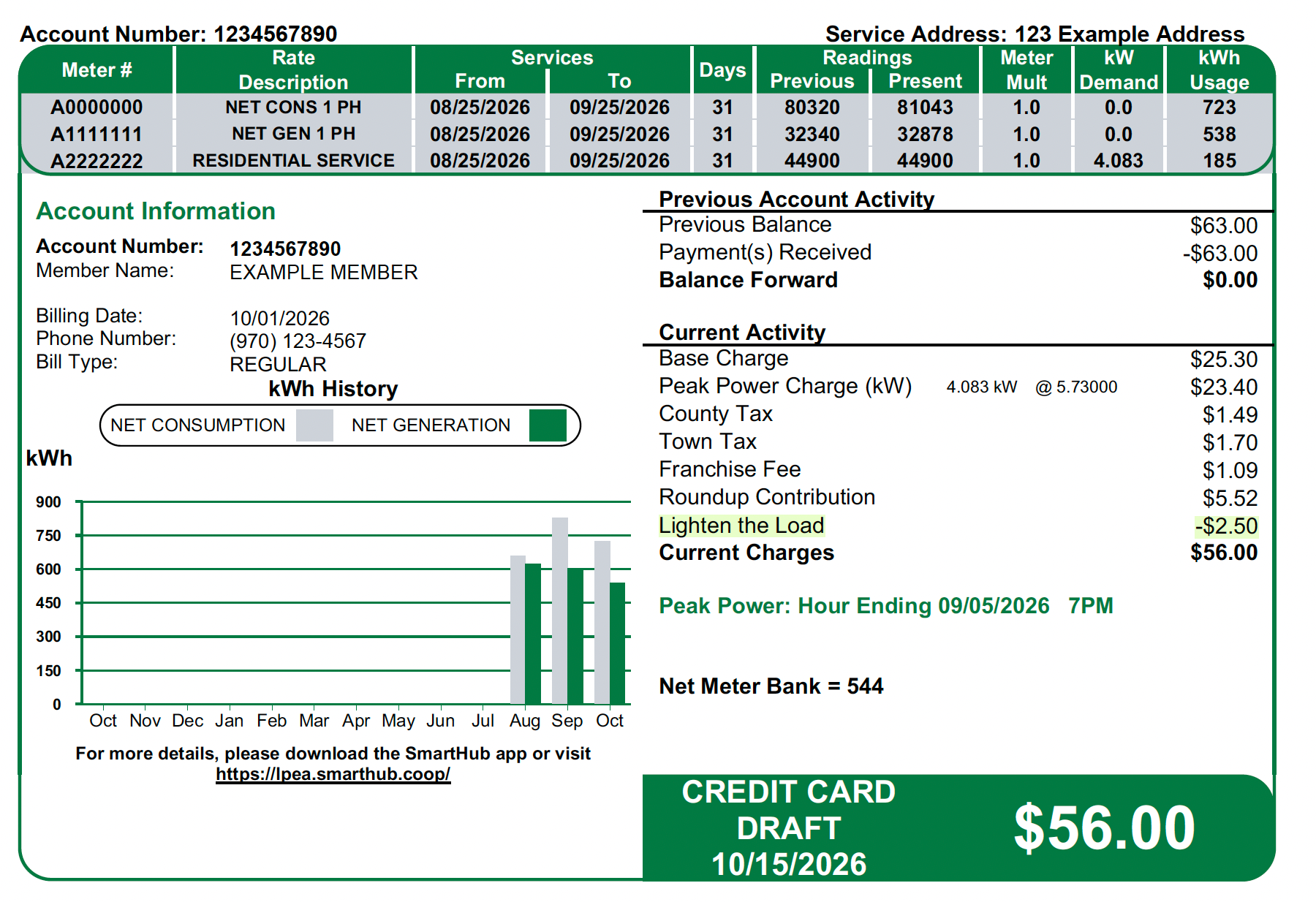
- Bill credits appear on the Participant’s LPEA bill as a “Lighten the Load” line item.
- Bill credits will be aggregated by month in which the LTL Events took place and paid on the following month’s bill.
- Annual bill credit maximum of $100 per account, per calendar year, based on the date of the LTL Event. Bill credits earned after an account reaches the maximum will not be issued, and LPEA may adjust any bill credit to not exceed this maximum.
6. Program Changes and Termination
6.1 Participant Termination
- Participants may disenroll from the program at any time without any penalty
- Termination requests must be submitted by phone at 970-247-5786 or by email at LTL@lpea.coop
- Participation will be canceled upon closing or deactivation of an account
6.2 LPEA Modifications or Termination
LPEA reserves the right to:
- Modify program terms at any time
- Adjust bill credit rates at any time
- Cancel or suspend the program at any time
7. Data Collection and Privacy
By participating in the program, the Participant agrees that LPEA may:
- Collect and analyze the Participant’s electrical energy usage data
- Use aggregated and anonymized data for program evaluation and reporting
8. No Warranty, Disclaimers, Indemnification, Limitation of Liability
8.1 NO WARRANTY
PARTICIPATION IN THE PROGRAM IS AT THE PARTICIPANT’S SOLE DISCRETION AND RISK. THE PROGRAM IS OFFERED “AS IS” AND “AS AVAILABLE” WITHOUT WARRANTIES OF ANY KIND. LPEA EXPRESSLY DISCLAIMS ALL WARRANTIES OF ANY KIND RELATING TO THE PROGRAM, WHETHER EXPRESS, IMPLIED, OR STATUTORY (INCLUDING, WITHOUT LIMITATION, ANY IMPLIED WARRANTIES OR CONDITIONS OF MERCHANTABILITY, FITNESS FOR A PARTICULAR PURPOSE, TITLE, NON-INFRINGEMENT OR NON-MISAPPROPRIATION OF INTELLECTUAL PROPERTY RIGHTS OF A THIRD PARTY) AND ANY WARRANTIES OR CONDITIONS ARISING UNDER ANY OTHER LEGAL REQUIREMENT. LPEA MAKES NO WARRANTIES THAT THE OPERATION OF THE PROGRAM WILL BE UNINTERRUPTED OR ERROR-FREE. LPEA MAKES NO GUARANTEE OF AN UNINTERRUPTED SUPPLY OF POWER.
8.2 Disclaimers
- LPEA makes no guarantee of savings, bill credit amounts, or electricity bill savings
- LPEA does not guarantee any specific reduction in electrical energy usage or demand
- In the circumstances when there is insufficient data caused by insufficient meter communication, outages, or other circumstances, LPEA will not be able to calculate an actual electrical energy usage, and the Participant will not be eligible for a bill credit for the LTL Event
- Nothing in these Terms and Conditions constitutes an endorsement by LPEA of any goods or services provided by a contractor, an OEM, a retailer, or a distributor
- LPEA is not responsible for any pre-existing conditions, circumstances, or events, including, but not limited to, structural defects, or other environmental hazards existing at Participant’s residence
- Participants are solely responsible for determining which electrical energy-saving actions are appropriate for their household
- LPEA will not be liable for any loss, damage, inconvenience, cost, or expenses arising from participating in the Program
- Bill credits are subject to program funding availability
- Bill credits are calculated from LPEA’s meter data, and LPEA’s determination is final
- LPEA is not responsible for LTL Event notifications that are delayed, not delivered, or not received
- LPEA’s sole obligation under the Program is the administration of the Program and payment of earned bill credits in accordance with these Terms and Conditions
8.3 Indemnification
To the fullest extent permitted by applicable law, the Participant agrees to indemnify and hold harmless LPEA, its affiliates, and each of their respective members, officers, directors, employees, and agents (each, an “Indemnified Party”), from and against any claims, liabilities, damages, losses, and expenses, including without limitation reasonable attorneys’ fees and costs, arising out of or in any way connected with participation in the Program, the termination of participation in the Program, or the inability to participate in the Program. Participants have no obligation to indemnify an Indemnified Party to the extent of the sole negligence or willful misconduct of such Indemnified Party.
8.4 Limitation of Liability
PARTICIPANT AGREES THAT, TO THE FULLEST EXTENT PERMITTED BY APPLICABLE LAW, UNDER NO CIRCUMSTANCES SHALL THE INDEMNIFIED PARTIES BE LIABLE TO PARTICIPANT FOR ANY INDIRECT, INCIDENTAL, SPECIAL, OR CONSEQUENTIAL DAMAGES, ARISING OUT OF PARTICIPATION IN THE PROGRAM, THE TERMINATION OF PARTICIPATION IN THE PROGRAM, OR THE INABILITY TO PARTICIPATE IN THE PROGRAM, EVEN IF LPEA HAS BEEN ADVISED OF THE POSSIBILITY OF SUCH DAMAGES. IF PARTICIPANT IS DISSATISFIED WITH THE PROGRAM OR WITH ANY OF THESE TERMS, OR FEELS LPEA HAS BREACHED THESE TERMS, PARTICIPANT’S SOLE AND EXCLUSIVE REMEDY IS TO DISCONTINUE PARTICIPATION IN THE PROGRAM. THE MAXIMUM LIABILITY OF EACH OF THE INDEMNIFIED PARTIES SHALL NOT EXCEED ONE HUNDRED DOLLARS ($100.00).
8.5 Exclusions
NOTHING IN THESE TERMS IS INTENDED TO EXCLUDE OR LIMIT LIABILITY THAT CANNOT BE EXCLUDED OR LIMITED UNDER APPLICABLE LAW.
9. Contact Information
For questions about the LTL program:
- Email: LTL@lpea.coop
- Phone: 970-247-5786
- Website: https://lpea.coop/lighten-the-load
10. Agreement
-
Enrollment in the Program constitutes acceptance of these Terms and Conditions.
